

- PhotoStation Professional
- PhotoStation Professional with PhotoBook+Gift
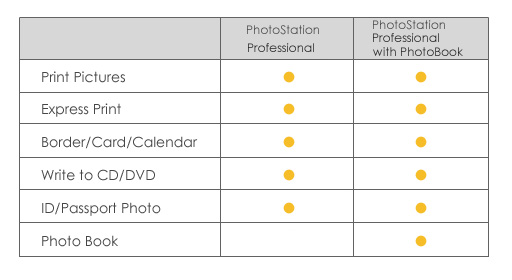
The GenieSTAR PhotoStation photo kiosk software gives customers flexibility. The software comes with multiple language packs that includes English, French, German, Italian, Lithuanian, Russian, Spanish, traditional Chinese, and simplified Chinese. Depending on business necessities in your area, you can decide to have PhotoStation Professional either with or without PhotoBook. See more details about PhotoBook here.
The software is also effective for photo lab owners that prefer using GenieSTAR PhotoStation in the lab; it can easily be configured so that the owner can access all folders of the hard drives and media cards. In addition, if you do not wish to use a touch screen monitor or mouse to operate the software, keyboard shortcuts can be used to efficiently process customers' orders.
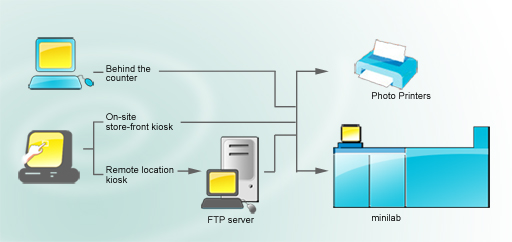
- Digital Camera (Secure Digital Card, CompactFlash Card, Smart Media Card, Memory Stick, Memory Stick Pro, IBM Microdrive, MultiMedia Card and xD-picture Card media formats)
- CD (CD-ROM)
- Disk (Floppy Disk)
- USB (Flash Drive)
- Bluetooth device
- Receipt Printer
The receipt includes customer and sales information. - Inkjet Printers, Dye-Sub Printers, Digital Minilabs
For example, print photo directly from Noritsu QSS / dDP series minilabs,
Fuji C8 / PIC / PIC Pro, and AGFA d-lab / MSC100
 back
to top
back
to topPhotoBook+Gift
PhotoStation Professional with PhotoBook+Gift

PhotoBook is included in PhotoStation Professional with PhotoBook software. PhotoBook allows you to:
- select a book size
- select a theme for the book
- select and preview photos
- edit and enhance photos
- automatically or manually arrange photos on each page
- preview the completed book
binding options:
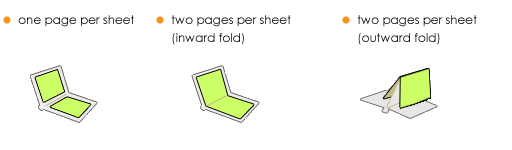
available book sizes*:
- imperial book sizes:
5" x 5", 5" x 7" landscape & portrait, 8" x 8", 8" x 10", 10" x 10", A4 landscape & portrait, 8.5" x 11" landscape & portrait - metric book sizes:
13cm x 13cm, 13cm x 18cm landscape & portrait, 20cm x 20cm, 20cm x 25cm, A4 (21cm x 30cm) landscape & portrait, 25cm x 25cm
*Contact GenieSTAR with book size suggestions